Live call copilot vs AI notetaker: what's really different
Notetakers like Fathom, Fireflies and Otter capture the call. A live call copilot helps you steer it. Seven differences, and when you want which.
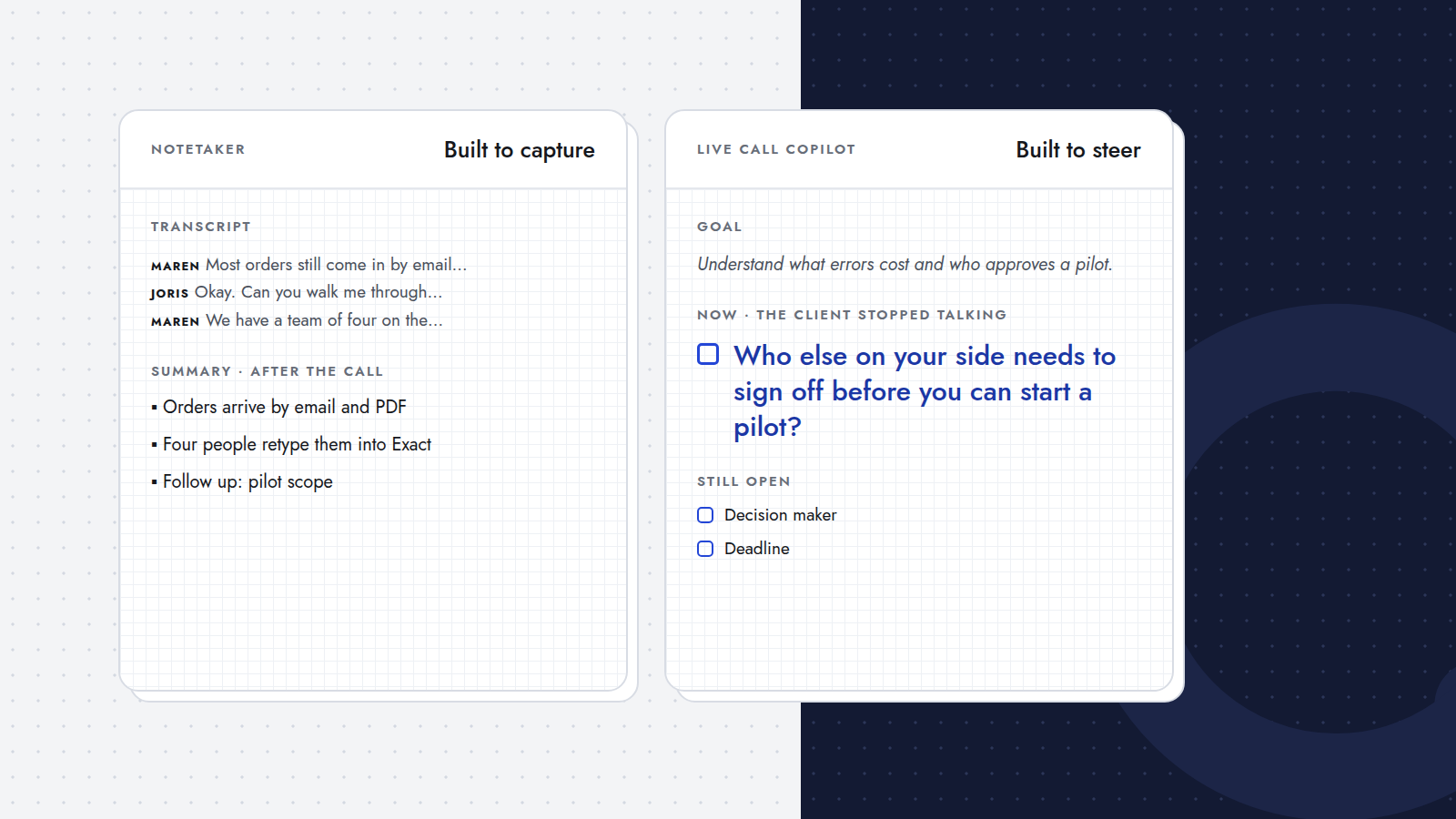
An AI notetaker is built to capture a call: it records what was said and turns it into a transcript, a summary and action items. A live call copilot is built to help you steer a call: it starts from the goal you set before the call and, while the call is going, suggests what to ask next. Both use speech recognition and AI, which is why they get mixed up. But they answer different questions: "what did we say?" versus "what should I ask now?".
This post goes through what each is built for, where they now overlap, seven differences that matter once you're in a call, and what notetakers simply do better.
At a glance
- Built for: a notetaker captures the meeting; a copilot helps you run it.
- Starts from: a notetaker starts from the recording; a copilot starts from your goal or checklist.
- Main output: a notetaker gives you a transcript, summary and action items; a copilot gives you the next question.
- Best moment: a notetaker shines after the call; a copilot during it.
- Made for: a notetaker serves your team, your archive and your CRM; a copilot serves the person in the call.
What is an AI notetaker built for?
Tools like Fathom, Fireflies and Otter record your meetings and turn them into something you can use afterwards: a searchable transcript, a summary, decisions, action items, and often a sync to your CRM. That is valuable. You don't have to type while you talk, colleagues who weren't there can catch up, and nothing that was said gets lost.
Many notetakers join the meeting as a participant to do this, which is why you see "notetaker has joined" in so many calls. That is changing: in 2026 Fathom added a mode that transcribes calls without a bot joining (TechCrunch).
Don't notetakers help during the call too now?
Some do, and it's worth being precise about it:
- Fireflies Live Assist shows live notes and a live transcript during the meeting, and lets you ask for things on demand, such as follow-up suggestions, a catch-up of the last minute or a summary so far. The live notes need the Fireflies bot in the meeting (Fireflies guide).
- Otter streams a live transcript while the meeting happens, and you can ask Otter questions about the discussion as it goes (Otter).
So "notetakers only help afterwards" is no longer the whole story. The difference is in what the live features are built around: the recording, and your requests. You open a panel, read, and click when you want something. A live call copilot is built around the goal of the call and the moment the client stops talking, and it comes to you.
Seven differences that matter in a call
1. It starts from your goal, not from the recording
A copilot needs to know what the call is for: "understand how orders come in, what errors cost, and who approves a pilot". Everything it suggests is measured against that. A notetaker doesn't need a goal to do its job; it captures whatever happens.
2. It speaks up at the right moment, without being asked
The best moment for a follow-up question is right after the client says something that opens it. A copilot is built to catch that moment: when the client finishes a turn, it offers the question. With on-demand features you first have to notice you need help, look away, and ask for it.
3. You get one question, not a document
A transcript or a list of notes is something to read. In the middle of a conversation you have about a second to glance down. That is why a copilot shows one short question, with at most an alternative, instead of a page of text.
4. Your eyes stay on the client
Reading a live transcript while someone talks to you splits your attention between two conversations: the real one and the written one. A copilot's window is small and quiet on purpose, so you can glance at it between sentences and go back to listening.
5. It keeps track of what's still open
A copilot keeps your checklist in view during the call and aims its questions at the points that are still open, so you notice a gap while there is still time to ask. With a notetaker, the gaps tend to show up in the summary, after the client has already hung up.
6. It is for the person in the call
Notetakers shine for teams: shared recordings, searchable archives, CRM updates, coaching. A copilot is for one person, in one call, right now. That makes it especially useful for people who run their own calls, like agency owners, consultants and freelancers.
7. No extra participant
A copilot doesn't need to record the meeting for anyone else, so it doesn't need to be in it. Querly, for example, runs on your laptop and listens through your microphone and speakers: no bot in the participant list, and the question window stays off your screen when you share it. The call stays a conversation between people.
What does a notetaker do better?
Quite a lot, and it's worth saying plainly:
- A record of the call. A full transcript and recording you can go back to, quote from and share.
- Summaries and action items, ready to paste into an email or your CRM.
- Search across calls: "what did we promise Kade about returns?"
- Team use: sharing, coaching, onboarding new people with real calls.
A live call copilot doesn't try to be your archive. It tries to make the call itself better.
Should you use both?
For many people, yes. They cover different halves of the same call:
- Before the call: the copilot turns your goal into a briefing.
- During the call: the copilot suggests the next question; the notetaker records.
- After the call: the notetaker gives you the summary; you send the recap. (Here's a recap email template that works.)
If you only pick one, ask yourself where your deals actually get stuck. If it's forgetting what was said, get a notetaker. If it's hanging up without the information your proposal needs, which is why deals go cold between discovery call and proposal, a copilot is the one that helps.
Where does Querly fit?
Querly is a live call copilot for discovery and sales calls. You write the goal of the call or a checklist; Querly prepares a briefing, listens on your own laptop, and each time the client stops talking shows one question of at most thirty words, with an alternative. It works with any call app, in English and Dutch, and runs next to your notetaker.
A neat way to see the difference: take a transcript your notetaker already made, and replay it through Querly. You'll see which questions you would have been handed, and at which moments.
Frequently asked questions
What is the difference between a live call copilot and an AI notetaker?
An AI notetaker records a call and turns it into a transcript, summary and action items. A live call copilot starts from the goal you set for the call and suggests what to ask next while the call is still going. One captures the conversation; the other helps you steer it.
Do AI notetakers work during the call?
Some now do. Fireflies Live Assist shows live notes and on-demand suggestions during a meeting, and Otter streams a live transcript you can ask questions about. Those features are built around the recording and your requests, while a live call copilot is built around your goal and offers a question at the moment the client stops talking.
Can I use a live call copilot and a notetaker together?
Yes. They cover different parts of the call: the copilot helps you ask the right questions during it, and the notetaker gives you the record and the summary afterwards. Querly runs next to any notetaker.
Does a live call copilot join the meeting?
It depends on the product. Querly doesn't: it runs on your own laptop and listens through your microphone and speakers, so there is no extra participant in the call.