Updated
What is a live call copilot? A practical guide
A live call copilot listens to a sales call and suggests what to ask next while it's still going. How it works, and how it differs from a notetaker.
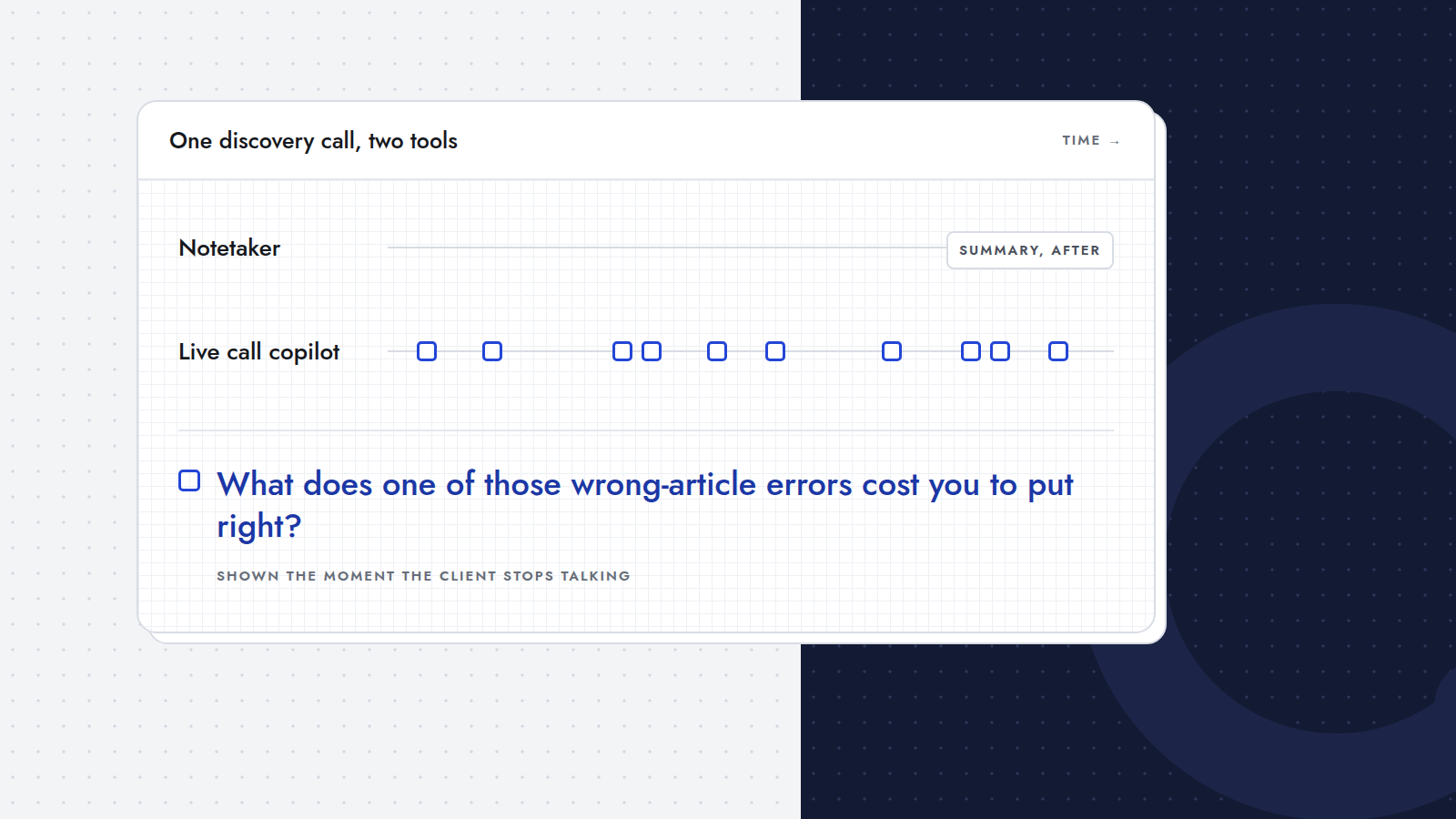
A live call copilot is software that listens to a conversation while it happens and helps you during the call itself: it suggests the next question to ask, keeps track of what you still need to find out, and points out when the conversation drifts from your goal. It is the opposite of a notetaker, which records the call and summarizes it afterwards.
This guide explains how a live call copilot works, how it differs from notetakers and conversation intelligence tools, when it helps, and what to look out for.
In short
- A notetaker is built to capture what was said. A live call copilot is built to help you decide what to ask next.
- It works from a goal or checklist you write before the call and compares the conversation against it.
- It matters most in calls where one missed question costs you money: discovery calls, intakes, scoping and sales calls.
- Good copilots stay out of the way: one suggestion at a time, readable in a second, and no extra participant in the meeting.
Why do people need help during a call?
Because running a good call is several jobs at once. You listen to what the client says, think about what it means for your proposal, keep the conversation natural, watch the clock, and try to remember everything you still wanted to ask.
Human attention is not built for that. Research on working memory suggests that adults can hold about four chunks of information in focus at once (Cowan, 2001, Behavioral and Brain Sciences). A discovery checklist easily has ten points. While the client tells a story, those points quietly drop out of focus, and you only notice after the call.
Timing makes it harder. A follow-up question is best asked right after the client says something that opens it, and that is exactly the moment you are busiest listening. (Which questions to have ready is covered in 45 discovery call questions.)
How does a live call copilot work?
Most live call copilots follow the same four steps:
- Before the call: a goal. You write what the call is for, as a sentence or a checklist. "Understand how orders come in today, what errors cost, and who approves a pilot." Some copilots turn that goal into a short briefing with topics and questions to cover.
- During the call: listening. The copilot hears the conversation and turns it into text in real time. Depending on the product, it listens through a bot that joins the meeting or through the audio on your own computer.
- At the right moment: a suggestion. When the other side finishes speaking, the copilot compares what was said with your goal and suggests what to ask next. A good suggestion fits the moment: it follows up on what the client just said, or covers a point on your checklist that is still open.
- After the call: what's left. You see which points were covered and which are still open, so the follow-up is short and specific.
The hard part is not the technology but restraint. A copilot that shows five suggestions, or changes its advice every few seconds, becomes one more thing to manage during the call. The useful ones show one thing at a time and stay quiet otherwise.
How is it different from a notetaker?
A notetaker such as Fathom, Fireflies or Otter is built to capture the meeting: a transcript, a summary, action items, a searchable archive. Several now add live features too, like a live transcript or suggested follow-ups you can open during the call. A live call copilot is built the other way round: around the goal of this one call, and around the moment the client stops talking. Many people use both. We compare them point by point in live call copilot vs AI notetaker.
How is it different from conversation intelligence?
Conversation intelligence platforms, such as Gong, analyze large numbers of recorded calls for a sales team: talk ratios, topics, deal risks and coaching moments. They are built for sales managers and for improving a team over weeks and months.
A live call copilot is built for the person in the call, in the moment. It doesn't need hundreds of calls to be useful; it needs your goal for this one.
Who is a live call copilot for?
It helps most when you run your own calls and the outcome of the call is money:
- Agency owners in discovery calls that decide whether a project happens and how big it gets.
- Consultants in intakes where one sharp follow-up sets the scope of the engagement.
- B2B account managers in renewal and expansion calls.
- Freelancers doing intake calls alone, without a colleague taking notes.
It helps less in internal meetings, support calls or conversations without a clear goal. There is nothing to steer towards.
What should you look for in a live call copilot?
- One suggestion at a time. You should be able to read it in a second, between two sentences.
- Timing. Suggestions should arrive when the other side finishes speaking, not in the middle of their sentence.
- Your goal, not a generic script. The questions should follow from what you are trying to find out in this call.
- No extra participant. A bot in the participant list changes the feel of a call. Ideally nothing joins the meeting, and the suggestion window stays off your screen when you share it.
- Your language. If you run calls in more than one language, check that it follows both.
- Care with data. The other side's words are personal data. Check what is stored, for how long and where. Rules on recording and transcribing calls differ by country, so check what applies to you; many teams mention it in the meeting invite.
Where does Querly fit?
Querly is a live call copilot for discovery and sales calls. You write the goal of the call or a checklist; Querly prepares a briefing, then listens on your own laptop through your microphone and speakers. The moment the client stops talking, it shows the one question to ask next, of at most thirty words, with an alternative. No bot joins the meeting, so the call stays a conversation, and the question window stays off your screen when you share it. It works with any call app and in English and Dutch. The desktop app runs on Windows and is in early access.
You can try the idea on one of your own past calls: replay a notetaker transcript and see which questions you would have been handed, and when. For why this matters after the call too, read why deals go cold between discovery call and proposal.
Frequently asked questions
What does a live call copilot do?
It listens to a call as it happens and suggests what to ask next, based on a goal you set before the call and on what the other side just said. Some also keep track of which points on your checklist are still open.
Is a live call copilot the same as an AI notetaker?
No. A notetaker is built to record and summarize the call, although some now show live notes too. A live call copilot is built around your goal for the call and suggests what to ask while there is still time. Many people use both.
Does a live call copilot join the meeting?
That depends on the product. Some join as a bot in the participant list. Others, like Querly, run on your own computer and add nothing to the meeting, so the call stays a conversation between people. Either way, it's good practice to mention at the start that you use an assistant for your notes.
Which calls is a live call copilot most useful for?
Calls with a clear goal where a missed question costs you: discovery calls, client intakes, scoping calls and sales calls. It is less useful for internal meetings or calls without a goal.